duckdb-harbor
DuckTable
A fast, minimal desktop client for DuckDB. Query, browse, and edit your data. Nothing else.
DuckTable speaks to DuckDB Harbor
and requires it. It never links DuckDB and never opens a database file
itself: it reaches every database through a Harbor server, a file on this
Mac or a remote by name, and Harbor owns the engine, the files, and the
versioning. Local files work through Harbor’s spawn-on-demand, the same way
harbor <file> opens them.
Screenshots
One window, three views — and three of the built-in themes. Click any shot for full resolution.
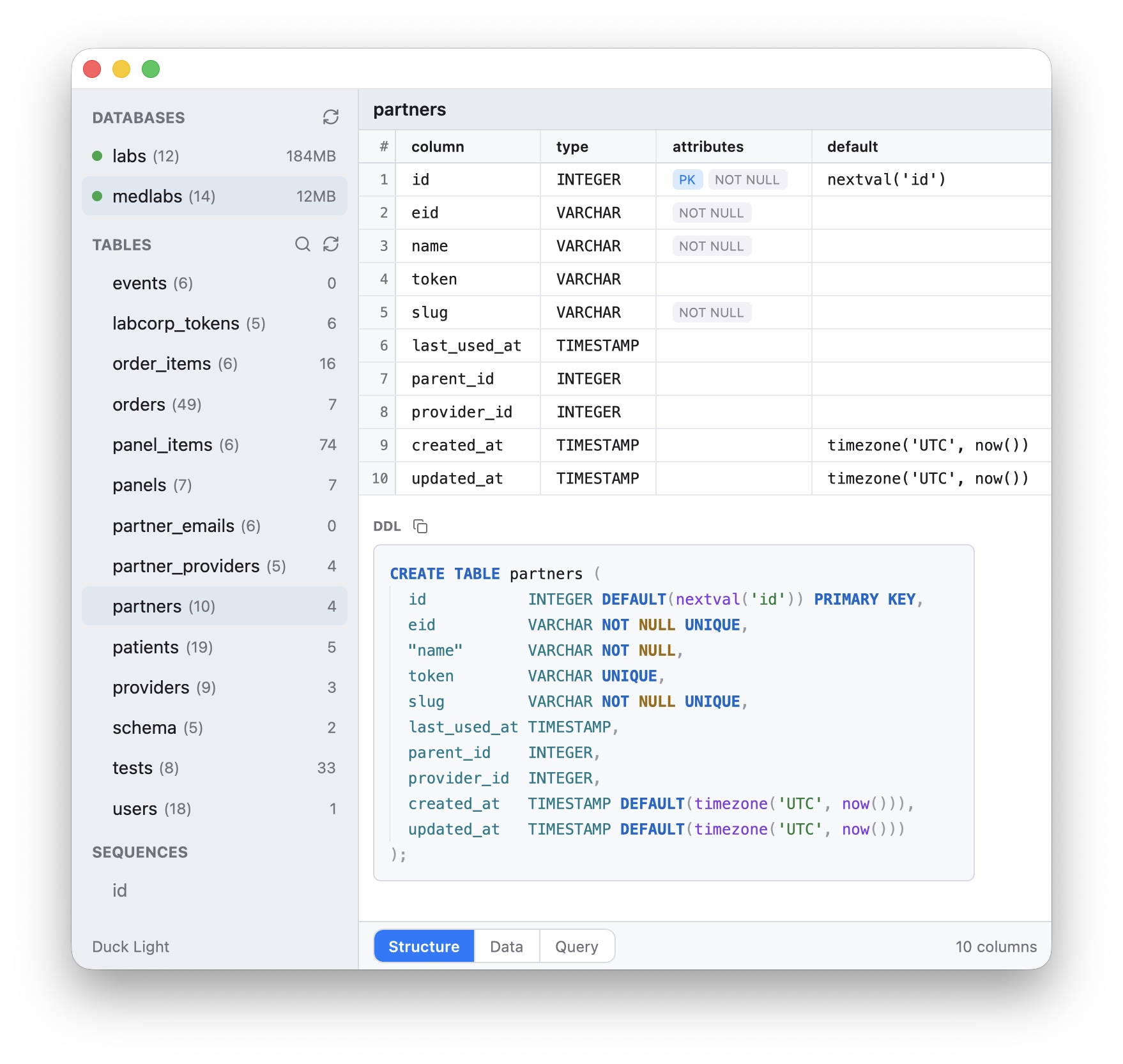
Structure — every column with its type, attributes, and defaults, and the table’s DDL below, drawn as the engine would write it. (Duck Light theme.)
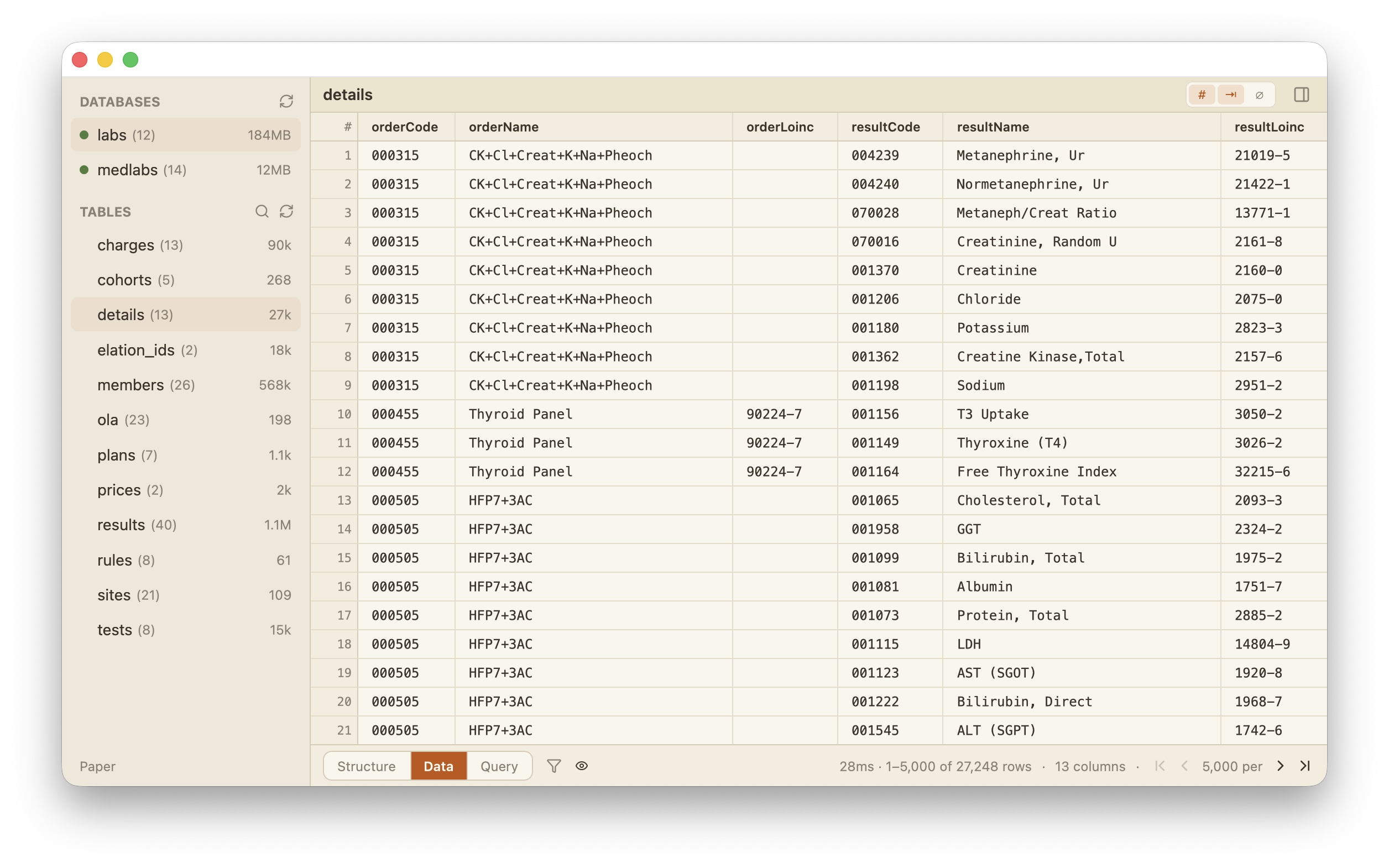
Data — 27k rows paged 5,000 at a time in 28ms, with row numbers, right-aligned numerics, and NULL tags each one keystroke away. (Paper theme.)
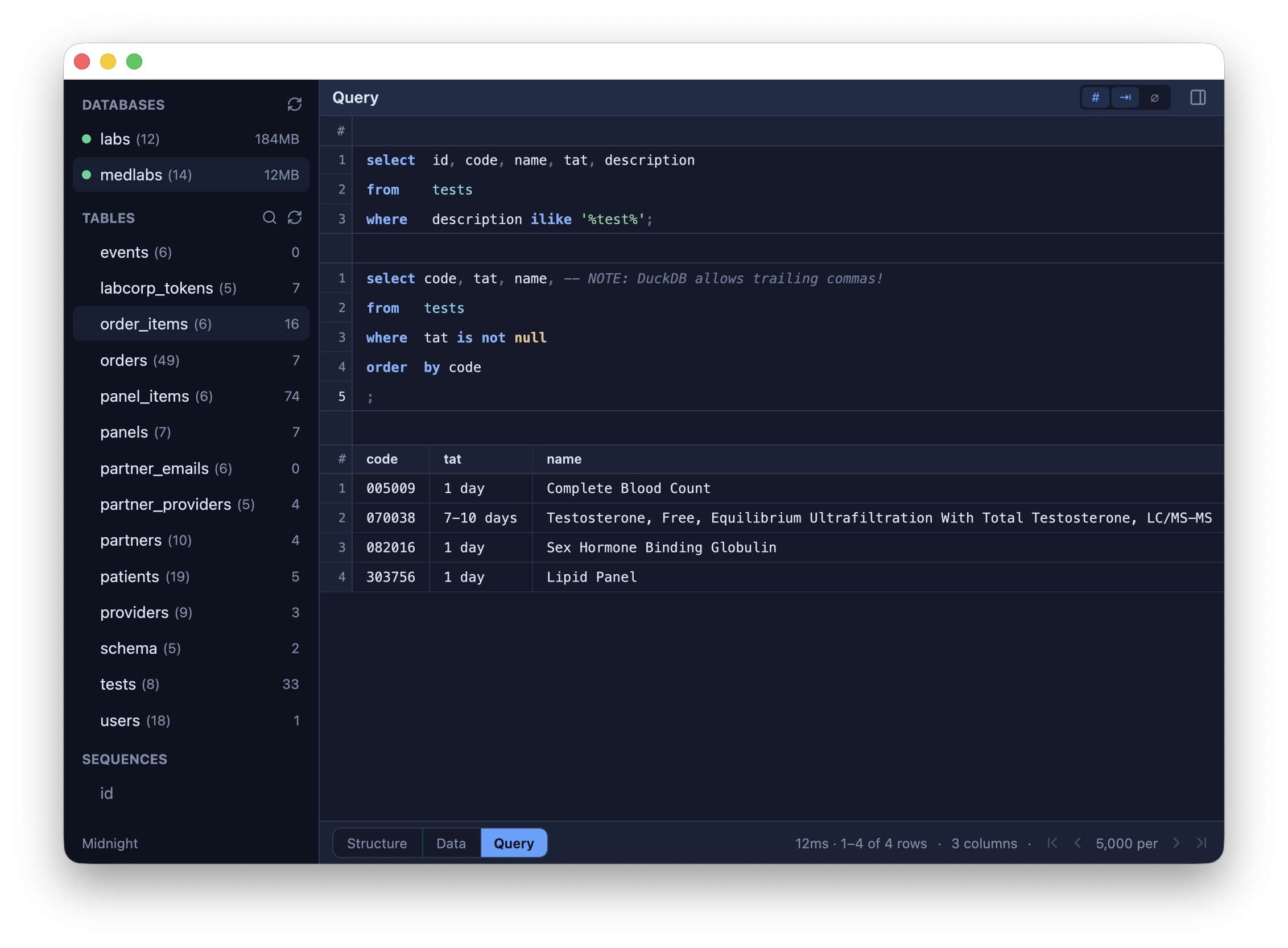
Query — a SQL scratchpad above live results. Statements wear bands
in the gutter, line numbers restart per statement to match the engine’s
own LINE n diagnostics, and ⌘Enter sends the statement under the
caret. (Midnight theme.)
Install
With Homebrew:
$ brew install --cask shreeve/tap/ducktable
Or with one command, which drops DuckTable.app into /Applications from
the latest release:
$ curl -fsSL https://raw.githubusercontent.com/shreeve/duckdb-harbor/main/ducktable/scripts/install.sh | bash
Apple Silicon. The app is signed with a Developer ID and notarized by Apple, so it opens on first launch however it was downloaded, the release’s zip from a browser included.
An installed copy is replaced by rename: the old app steps aside, the new one
takes its name, and the old one is removed last, so an install that fails
leaves the DuckTable you had. The installer then registers the bundle with
Launch Services, so Finder, Spotlight and System Settings know it at once.
... | DUCKTABLE_DEST=dir bash installs into another directory.
Uninstall with ... | bash -s -- --uninstall — the app goes; your settings
(~/.config/ducktable) and your databases stay.
After that, DuckTable keeps itself current: DuckTable → Check for Updates…, or say yes to the first-launch prompt and it checks once a day (docs/UPDATES.md).
To build from source: clone the repo and run
ducktable/scripts/macos-app.sh release; scripts/install-local.sh builds
and installs in one step, with the same swap.
Every build is signed with the Developer ID under one identifier,
com.shreeve.ducktable, and the build fails if the app or its executable
reports any other. macOS files an app’s privacy decisions under that name, so
it never changes. Without the certificate, SIGN=- scripts/macos-app.sh
builds ad hoc (docs/UPDATES.md).
Databases by port
Choose File → Open Database URL… when Harbor is already listening on a TCP
port. Give the database a sidebar name, host, and port. localhost
connects directly; any other host makes DuckTable create the SSH tunnel:
Name  Production
Host  foo.bar.com
Port  9494
DuckTable asks macOS’s /usr/bin/ssh to forward a unix socket of its own to
127.0.0.1:9494 as seen from foo.bar.com, then speaks Harbor through that
socket. The socket sits in Harbor’s runtime directory, which only you can
enter, so no other user of the Mac reaches the database through the tunnel,
as any could through a loopback port. SSH runs unattended and honors
~/.ssh/config, keys, certificates, ProxyJump, ssh-agent, and the macOS
Keychain. Run ssh foo.bar.com once in Terminal if a host key or login still
needs confirmation.
macOS 15 and later gate each app’s traffic to the local network, and the ssh
DuckTable starts counts as DuckTable. For a host on your LAN, macOS decides
per app and, when it asks, shows the reason the bundle gives
(NSLocalNetworkUsageDescription: SSH tunnels to Harbor servers on the hosts
you add). The answer lives under System Settings → Privacy & Security → Local
Network, in one DuckTable row that follows the app across updates because its
signing identifier is fixed. Terminal is exempt from that gate and an app is
not, so when ssh host works in Terminal and DuckTable’s tunnel to the same
LAN host does not, look at that row first.
The SSH process belongs to that database connection. It uses protocol keepalives, stays alive while queries still hold the connection, and is closed and reaped when the database is closed, removed, replaced by another database, or DuckTable exits. Removing the sidebar entry forgets only its connection details; it never changes the database server.
The saved form is intentionally small:
[connection.production]
url = "http://foo.bar.com:9494"
For a local listener, save http://localhost:9494; DuckTable normalizes that
to IPv4 127.0.0.1 when connecting. Use File → Open Database File… when
starting from a DuckDB filename instead of a port.
Why Harbor-only
- One wire protocol, one type system, one EXPLAIN dialect.
- No C++ FFI, no bundled DuckDB, no engine version lock. The client is one app bundle with no DuckDB inside it.
- DuckDB’s ATTACH and scanner ecosystem (SQLite, Postgres, MySQL, Parquet, CSV, JSON, Iceberg, DuckLake) means one engine already reads most of your data. DuckTable inherits all of it without a driver matrix.
What it is not
No charting. No 30-driver matrix. No sync. No plugin ABI. The “lite” is the feature.
Stack
Rust and gpui-kit: GPUI (Zed’s
GPU-accelerated UI framework) with its component library, which supplies the
virtualized data table and code editor. Dependencies are pinned to crates.io
releases, except gpui-kit itself, which comes from a pinned commit of
a fork carrying a few
generic changes on top of the release; Harbor’s protocol crates are built from
the sibling harbor/ tree in this repository.
Status
Early releases, moving fast. Working today: the fleet sidebar, the paged
data grid with filters and column control, the Structure view with DDL,
staged cell editing with a Sheets-style keyboard grammar, and the Query
scratchpad with per-statement send. Requires Harbor 0.44.2 or later. See
docs/DESIGN.md for the architecture, the interface and what is planned.
License
MIT.